Acceptable Feature Count
The Acceptable Feature Count quality control (QC Quality Control) check identifies record counts in a layer or table and compares that count to parameters established by the user. It allows end users to manage feature counts within their data submission, ensuring feature classes and tables contain records. A fallout generates whenever the record count of a layer or table do not meet the designated requirements. As a result, this QC check can confirm your data meets one of the following expectations:
- contains no more than a maximum number of features
- contains at least a certain number of features
- contains a range of features
- contains a specific feature count
The GIS Geographic Information System. A computer application that involves storing and manipulating electronic maps and related data. Also, mapping software combining spatial information about where places and events are located with data attributes describing those places and events. Data Summary and Primary Account reports will reflect a Sync Percent of 100% if the layer or table satisfies this QC check’s parameters. If the layer/table fails to meet the designated feature counts, then the QC check generates a fallout and Sync Percent is 0%. The Features Analyzed column of these reports will always have a count of 1, regardless of the number of records scanned within the user’s layer/table. This is by design, and is an exception to the usual use of this column. For this QC check only, Features Analyzed refers to the number of feature classes or tables scanned for this particular check.
 Required QC Prerequisites
To run this check, a table or a single part feature class is required.
Feature classes with multipart features are heavily discouraged. This QC check does not count the number of visible features. It counts the number of records present in the attribute Nonspatial information about a geographic feature in a GIS, usually stored in a table and linked to the feature by a unique identifier. For example, attributes of a river might include its name, length, and sediment load at a gauging station. table. If a feature class contains multipart features, explode the data to convert them to single parts before ingesting into GeoComm GIS Data Hub for best results.
Configure QC Parameters
Configurations for QC check parameters contain filters to prevent selecting incompatible field types.
The following parameters can be specifically configured for the Acceptable Feature Count check.
- Run On: Non-configurable. This QC check inspects the target dataset.
- Severity: Sets the importance level of this QC check’s fallouts. Critical fallouts prevent export package outputs but will still provide fallouts.
- Layer or Table Name: The name of the feature class or table this QC check should inspect.
-
Acceptable Minimum Range: The smallest number of features you’d expect to see in this layer or table. If you expect a specific feature count in your data, then type that value in both the Acceptable Maximum and Acceptable Minimum Range boxes to generate a fallout if your data fails to match that exact record count.
- This parameter is mandatory.
- Positive whole numbers can be used.
- Zero can be used.
-
Acceptable Maximum Range: The largest number of features you’d expect to see in this layer or table. If you expect a specific feature count in your data, then type that particular value in both the Acceptable Maximum and Acceptable Minimum Range boxes to generate a fallout if your data fails to match that exact record count.
- This parameter is optional.
- Positive whole numbers can be used.
- Zero is not allowed.
What Does the Acceptable Feature Count QC Check Output Include?
The following information is included for this QC check's fallout output.
- QC check name
- Description of the QC check
- Feature class where the fallout appears
- Extended information providing more details about the fallout
- Feature count of the inspected layer or table
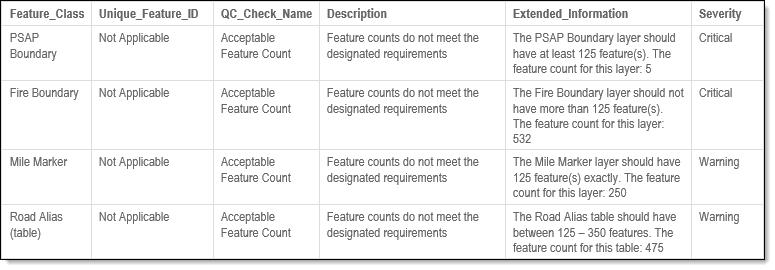
Examples - Fallout Report Records
The example below shows a sample of possible error messages you may receive when a record fails the Acceptable Feature Count QC check.
Examples - Configuration
The information below provides examples to use when configuring the Acceptable Feature Count QC check.
-
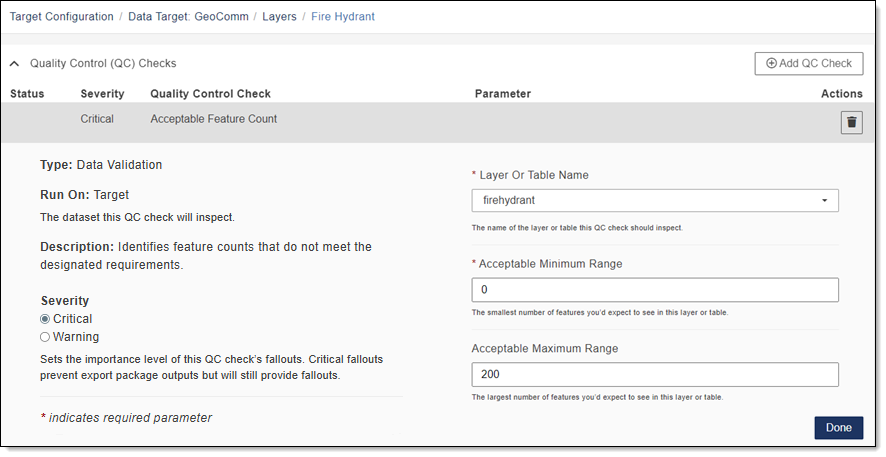
Must contain no more than this number of features: Your fire hydrant layer contains 200 point features and you want to ensure none are ever added without your knowledge. To configure the QC check to get these results, enter 200 in the Acceptable Maximum Range box. In the Acceptable Minimum Range box, enter 0. With this configuration, a fallout occurs if there are ever more than 200 fire hydrant features in that layer.
-
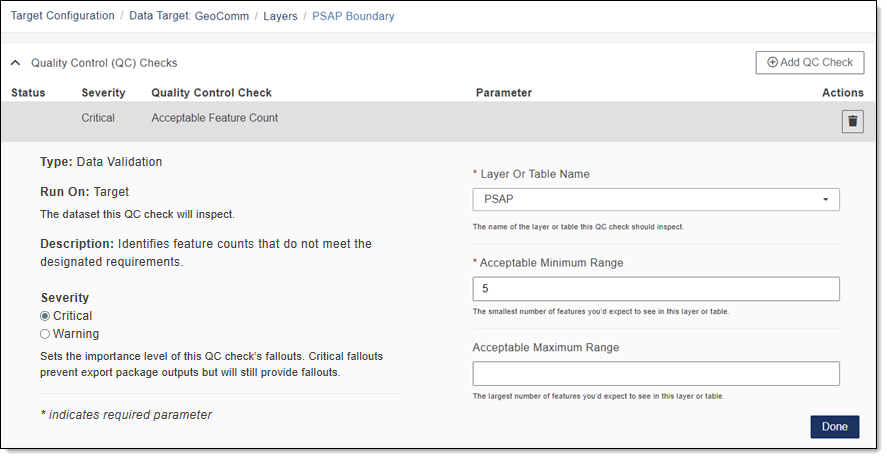
Must contain at least this number of features: Your PSAP Public Safety Answering Point. A set of call takers authorized by a governing body and operating under common management which receives 9-1-1 calls and asynchronous event notifications for a defined geographic area and processes those calls and events according to a specified operational policy./ECC boundary contains 5 features and you want to know if there are ever less than 5 PSAP/ECC polygons within that feature class. To configure the QC check to get these results, enter the value of 5 in the Acceptable Minimum Range box. With this configuration, a fallout will occur whenever that layer processes with less than 5 features.
-
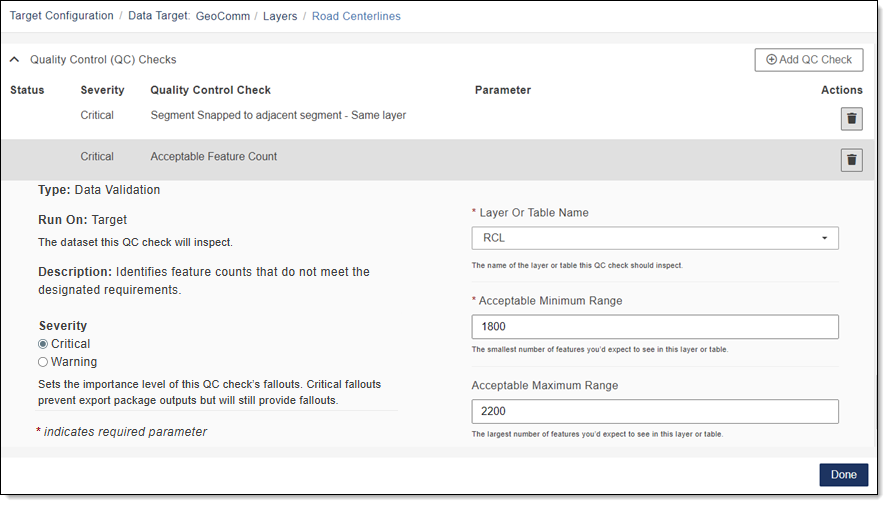
Scanning for a range of feature counts: Your data contains 2,000 roads in your roadcenterline feature class and you want to know if there are ever less than 1,800 or more than 2,200 roads in that layer. To configure the QC check to get these results, enter the value of 1,800 in the Acceptable Minimum Range box. In the Acceptable Maximum Range box, enter the value of 2,200. With this configuration, a fallout will occur whenever that layer processes with less than 1,800 roads or more than 2,200 roads.
-
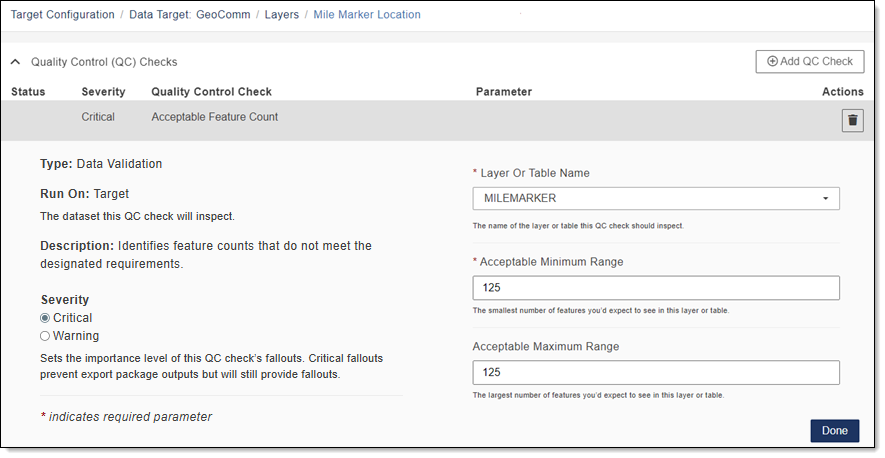
Scanning for a specific feature count: Your data contains a Mile Markers feature class with 125 mile markers and you want to have this QC check warn you if there are ever more or less than exactly 125 mile markers in this layer. To configure the QC check to get these results, enter the value of 125 in the Acceptable Maximum Range and Acceptable Minimum Range boxes. This configuration ensures that if you ever have more or less than 125 mile markers in your data, you are informed via a fallout record.
Unable to Successfully Process QC Check
There may be times when the Acceptable Feature Count check is unable to successfully process, therefore, a single fallout is created in the Fallout report as described below.
-
Unable to Determine Record Count: If the Acceptable Feature Count QC check is unable to determine the record count of a feature class or table, a fallout is created. The extended information in the Fallout report states, "The feature counts could not be calculated. Please confirm the validity of this data and try again."
-
Unable to Determine if QC Parameters are Met: If the Acceptable Feature Count check cannot determine whether the QC parameters are met, a fallout is created. The extended information in the Fallout report states, "The feature counts could not be compared against the user’s requirements. Please confirm the QC check’s parameters were set up correctly and try again."
These types of fallouts have a Severity level of Critical even if the user configured the QC check to run with a Severity level of Warning. This is due to the possibility of corrupt data when the QC check cannot determine a count. Creating a fallout in this scenario ensures the user has complete control over what data feeds into consuming application.
Additionally in these cases, the GIS Data Summary report will reflect a Critical Severity level to match the Fallout report.