Duplicate Values
The Duplicate Values quality control (QC Quality Control) check identifies instances where data records appear multiple times within a dataset. The check identifies duplicates by examining attributes, geometry, or both. Geometry duplicates must be identical, while attribute Nonspatial information about a geographic feature in a GIS, usually stored in a table and linked to the feature by a unique identifier. For example, attributes of a river might include its name, length, and sediment load at a gauging station. duplicates are detected by matching values within features in the same layer. Additionally, Duplicate Values treats null values, blank spaces, and whitespace-only values as identical.
Each duplicated feature is flagged with a fallout, making it easy to identify and address duplicated values on your map through selections in your attribute table.
When using the Duplicate Values QC check, all configured fields must be duplicated for this QC check to flag that feature for review. To identify if attributes are duplicated or geometry is stacked, create one QC check for the geometry and one or more for the individual attributes requiring inspection.
 Required QC Prerequisites
To run this check, a feature class or table is required.
Configure QC Parameters
Configurations for QC check parameters contain filters to prevent selecting incompatible field types.
The following parameters can be specifically configured for the Duplicate Values QC check.
- Run On: Non-configurable. This QC check inspects the target dataset.
-
Severity: Sets the importance level of this QC check’s fallouts. Critical fallouts prevent export package outputs but will still provide fallouts.
-
Layer or Table Name: The name of the layer or table this QC check should inspect.
-
Reporting Unique ID: A unique identifier in the layer or table that can be used to uniquely identify a singular feature.
-
Fields or Columns Used to Identify Duplicates: Choose which field(s) should be inspected for duplicate values. Use geometry to search for stacked features, or combine geometry with attributes for even stricter matching.
-
Case Sensitivity: Select Match Case to enable and maintain the integrity of upper or lower case text in your data. See Case Sensitivity.
What Does the Duplicate Values QC Check Output Include?
The following information is included for this QC check's fallout output.
- QC check name
- Description of the QC check
- Feature class where the fallout appears
- Unique ID
- Extended information providing more details about the fallout
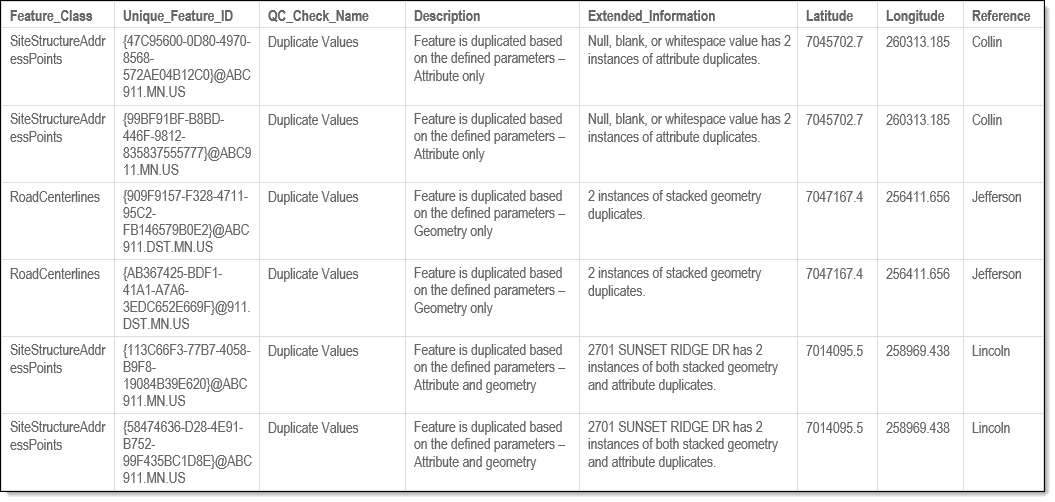
Examples - Fallout Report Records
The examples below show possible error messages you may receive when a feature is found to have duplicate attributes, geometry, or both when the Duplicate Values QC check is run. The extended information provides details of what was duplicated, type, and how many instances. Note that a fallout for each duplicate found is added to the report (i.e., 5 features that duplicate will trigger 5 fallouts in the report).