Field Comparison
The Field Comparison quality control (QC Quality Control) check identifies features that contain an invalid comparison. Specifically, the check reports comparisons across two or more fields in a single layer. Both tables and feature classes can be used. Field Comparison creates a fallout when the comparison made fails to match the configured parameters, and can be used to:
-
Compare like fields. For example, comparing a street name field to a legacy street name field where the value should be identical: St_Name = Legacy_St_Name
-
Compare parsed fields against concatenated fields. For example, combining separate street name fields to compare against a street full name field: St_PreDir + St_Name + St_Typ + St_PosDir = St_FullName.
-
Compare numeric fields. For example, verifying that road ranges ascend correctly, smaller address ranges in the FROM field and larger (or equal) address ranges in the TO field: FromAddrL <= ToAddrL
-
Compare against geometry fields. For instance, to identify road segments shorter than 5 feet (unit of measurement is pulled from the QC projection): GeometryField > 5
 Required QC Prerequisites
There are no prerequisites required to run this check.
Configure QC Parameters
Configurations for QC check parameters contain filters to prevent selecting incompatible field types.
The following parameters can be specifically configured for the Field Comparison QC check.
- Run On: Non-configurable. This QC check inspects the target dataset.
-
Severity: Sets the importance level of this QC check’s fallouts. Critical fallouts prevent export package outputs but will still provide fallouts.
-
Layer Name: The name of the layer or table this QC check should inspect.
-
Reporting Unique ID: A unique identifier in the layer that can be used to uniquely identify a singular feature.
-
Compare This: Field(s) or column(s) that will provide the baseline for comparison.
-
Using This Operator: The operator to use in the comparison. Specifies the relationship between the two parameters.
-
Against That: Field(s) or column(s) that will be compared against the baseline.
-
Case Sensitivity: Select Match Case to enable and maintain the integrity of upper or lower case text in your data. See Case Sensitivity.
Note: Geometry can be used when running Field Comparison. When configuring, type {GeometryField} in either the Compare This or Against That parameter. Input the numeric value you want to compare it against in the opposite field. The unit of measurement is automatically detected based on the projection. Any features that do not meet the specified criteria create a fallout. Use this, for example, to flag roads shorter than 5 feet or polygons smaller than 50 square feet.
What Does the Field Comparison QC Check Output Include?
The following information is included for this QC check's fallout output.
- QC check name
- Description of the QC check
- Unique feature identifier from the table
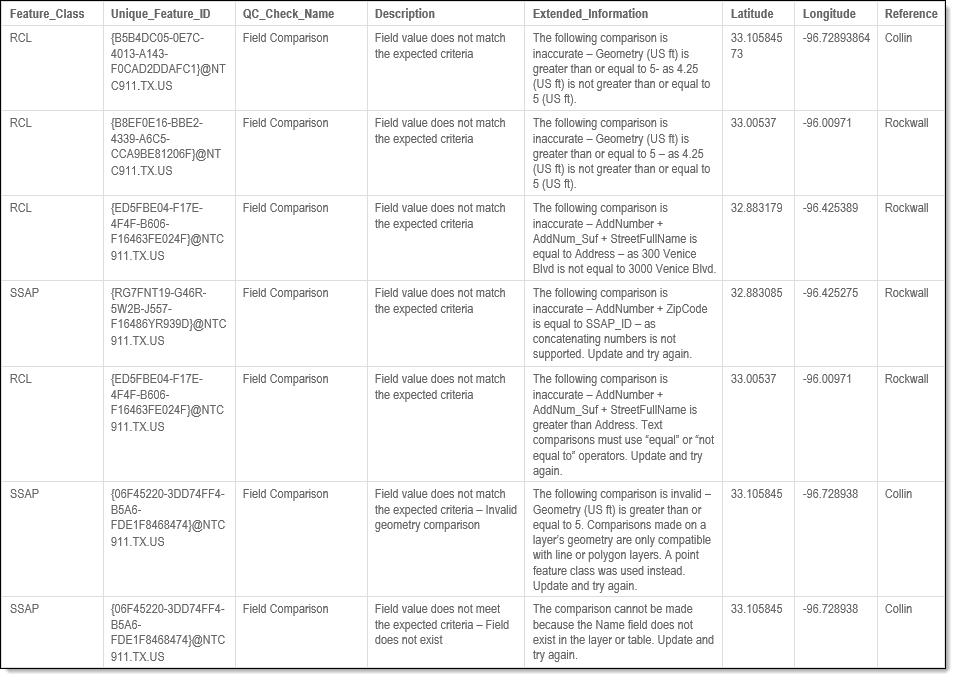
- Extended information providing more details about the fallout
- Latitude and longitude of the fallout's location (when applicable)
Examples - Fallout Report Records
The example below shows a possible error message you may receive when a record fails the Field Comparison QC check. The extended information provides the detected and expected results when comparing two or more fields in a single layer.
Note: Geometry or number comparisons display multiple decimal places—this is expected.