Line to Polygon Attribute Compare
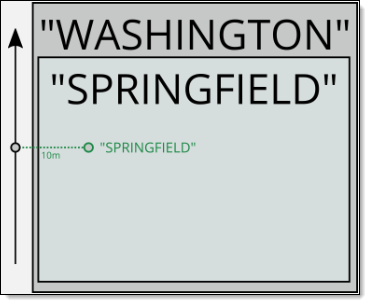
The Line to Polygon Attribute Compare quality control (QC Quality Control) check scans for an attribute Nonspatial information about a geographic feature in a GIS, usually stored in a table and linked to the feature by a unique identifier. For example, attributes of a river might include its name, length, and sediment load at a gauging station. mismatch between a line feature and the polygon it intersects, comparing the values in user designated fields to make sure they match.
Tip: Projection-Based Unit is used in this check. Projection-Based Unit indicates the unit of measurement is pulled from the Spatial QC Projection this data target uses. If no Spatial QC Projection is used in this data target, the unit is pulled from the Data Target's projection.
 Required QC Prerequisites
To run this check, the following are required.
-
A line feature class with attribution
-
A polygon feature class with attribution such as Municipal, EMS Emergency Medical Service. Response centers for services such as ambulance, fire department, hospital, and poisen control center., Law, Fire, ESZ Emergency Service Zone. A geographic area served by a unique set of law, fire, and medical responders, identified by an ESN., PSAP Public Safety Answering Point. A set of call takers authorized by a governing body and operating under common management which receives 9-1-1 calls and asynchronous event notifications for a defined geographic area and processes those calls and events according to a specified operational policy., County or State fields
Configure QC Parameters
Configurations for QC check parameters contain filters to prevent selecting incompatible field types.
The following parameters can be specifically configured for the Line to Polygon Attribute Compare QC check.
- Run On: Non-configurable. This QC check inspects the target dataset.
-
Severity: Sets the importance level of this QC check’s fallouts. Critical fallouts prevent export package outputs but will still provide fallouts.
- Line Layer Name: The name of the line layer this QC check should inspect.
-
Reporting Unique ID: A unique identifier in the layer that can be used to uniquely identify a singular feature.
-
Line Attribute to Compare: The field in the line segment to be compared against the intersecting polygon.
-
Polygon Layer Name: The name of the polygon layer this QC check should inspect. For example: County_Boundary or PSAP_Boundary.
-
Polygon Attribute to Compare: The polygon field to be compared against the intersecting line segment.
-
Offset (Projection-Based Unit): Choose to offset the line to the left or right. Distance is based on the line's projection. 0 is recommended. A positive value shifts the line to the right-hand side, a negative value shifts it left. Useful if the line features are close to a boundary.
-
Inspection Criteria: Select if all lines should be inspected or only those within a polygon boundary. By default, Inspect all lines in my layer is selected.
- Inspect Only Lines Covered by a Polygon. Select this option to have the QC check ignore all lines that are not covered by a polygon boundary configured in the QC check.
-
Inspect All Lines in my Layer. Select this option to have the QC check scan all lines in this layer and flag lines segments not covered by a boundary.
-
Case Sensitivity: Select Match Case to enable and maintain the integrity of upper or lower case text in your data. See Case Sensitivity.
What Does the Line to Polygon Attribute Compare QC check Output Include?
The following information is included for this QC check's fallout output.
- QC check name
- Description of the QC check
- Feature class where the fallout appears
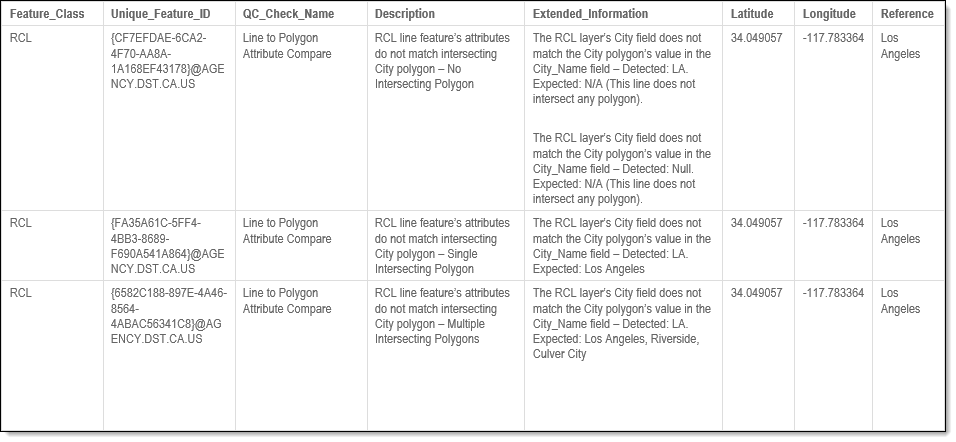
- Extended information providing more details about the fallout
- Identifier of the line that fails the comparison
- The detected and expected results for the QC check
- Latitude and longitude of the fallout's location
Examples - Fallout Report Records
The example below shows a possible error message you may receive when a record fails the Line to Polygon Attribute Compare QC check. The extended information provides the detected and expected results when comparing the polygon's attribute against the line layer's attribute for the chosen field.
Note: Only mismatches are included in the fallouts. If an attribute matches the line, it is not included in the report.
Examples - Issues Reported
-
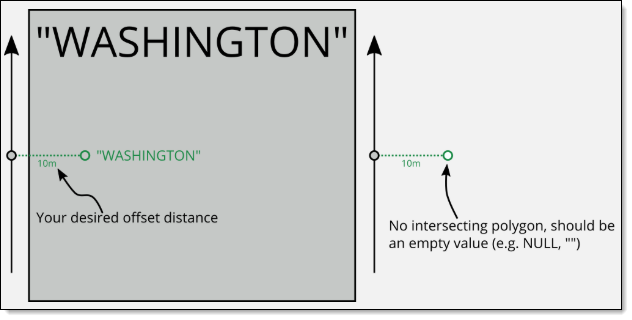
In this example, the feature was expected to not have a value.
-
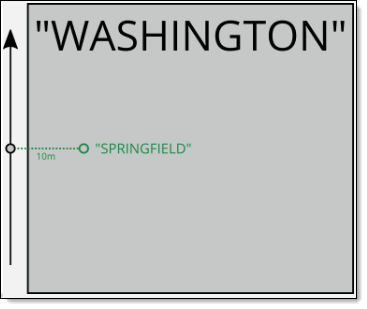
In this example, the feature failed an attribute comparison with an intersecting polygon (expected "WASHINGTON", result "SPRINGFIELD").
-
In this example, the feature intersects multiple polygons.