Unacceptable Values
The Unacceptable Values quality control (QC Quality Control) check identifies features containing forbidden values as defined by the user. Any features with values that match the unacceptable values list will create a fallout. This QC check can also be used to identify unacceptable values such as leading or trailing spaces and whitespaces.
 Required QC Prerequisites
To run this check, a feature class or table is required.
Configure QC Parameters
Configurations for QC check parameters contain filters to prevent selecting incompatible field types.
This QC check can be configured to run on any field or column with a list of defined forbidden values.
The following parameters can be specifically configured for the Unacceptable Values QC check.
- Run On: Non-configurable. This QC check inspects the target dataset.
- Severity: Sets the importance level of this QC check’s fallouts. Critical fallouts prevent export package outputs but will still provide fallouts.
- Layer or Table Name: The name of the layer or table this QC check should inspect.
- Reporting Unique ID: A unique identifier in the layer or table that can be used to uniquely identify a singular feature.
- Field Name or Column Name: The name of the field or column this QC check should inspect.
- Unacceptable Values List: A list of all unacceptable values this layer or table should not contain.
-
Remove Extra Spaces: Remove leading and trailing spaces, spaces that appear at the beginning or end of a value. Does not trim spaces between values. Converts values of only spaces to null values.
-
Select Yes to flag unacceptable values even if they contain extra spaces.
-
Select No to scan my data as is to flag leading, trailing, or whitespaces.
-
-
Case Sensitivity: Select Match Case to enable and maintain the integrity of upper or lower case text in your data. See Case Sensitivity.
-
Additional Unacceptable Values: Select the additional value(s) you want to add to the unacceptable values list. See Additional Unacceptable Values.
What Does the Unacceptable Values QC Check Output Include?
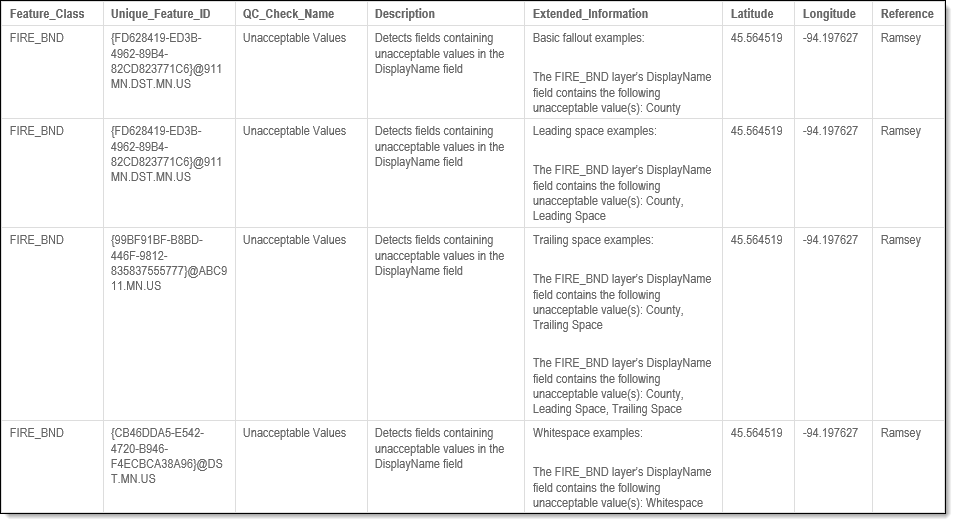
The following information is included for this QC check's fallout output.
- QC check name
- Description of the QC check
- Unique ID
- Value that is not acceptable
- Extended information providing more details about the fallout
- Latitude and longitude of the fallout's location
Examples - Fallout Report Records
The example below shows possible error messages you may receive when a record fails the Unacceptable Values QC check. The extended information provides the layer/table name and the layer's field/column name where the unacceptable value was located along with the value that was triggered the fallout.