Exception Code Basics
Exception codes enable the user to exclude a feature or tabular record from a particular action in GIS Geographic Information System. A computer application that involves storing and manipulating electronic maps and related data. Also, mapping software combining spatial information about where places and events are located with data attributes describing those places and events. Data Hub. (Throughout the Exception Code section, features and records will be referred to as features and layers and tables as layers). Subsequently, exception codes can be used to bypass the inspection of any feature in the user’s source data from the scrutiny of quality control (QC Quality Control) checks that honor them. This is useful when data uploaded to GIS Data Hub is part of a user’s dataset, but does not require inspection from QC checks.
For example, a Roadcenterline layer contains driveways, but the user does not require driveways to be properly snapped to other road segments. An exception code could be applied to all driveways to prevent the Segment Snapped to Adjacent Segment - Same Layer QC check from unnecessarily creating fallouts on these road segments.
Note: Exception code usage does not prevent all fallouts. Critical QC checks report all fallouts even when they have an exception code configured. The only exception is the use of the 999 exception code which prevents the data from being used in any QC checks or outputs GIS Data Hub creates.
Note: Both text and integer field types are supported for exception codes. However, integer field types only support the use of one exception code at a time since a comma cannot be added to separate exception codes in integer fields.
 Turning On Exception Codes
In GIS Data Hub, exception codes are activated by layer. This provides the user explicit control on which layers can use exception codes and which cannot. This also means that at this time, exception codes for a layer are either all on or all off. A user cannot enable for example, the Global Exclusion (999) exception, but deactivate an exception code for the Segment Snapped to Adjacent Segment - Same layer QC check.
Exception codes must be enabled in the Data Target Configuration page for that layer. To do this, locate the Exception Code Field drop-down and select the field that contains the user’s exception codes in the target data.
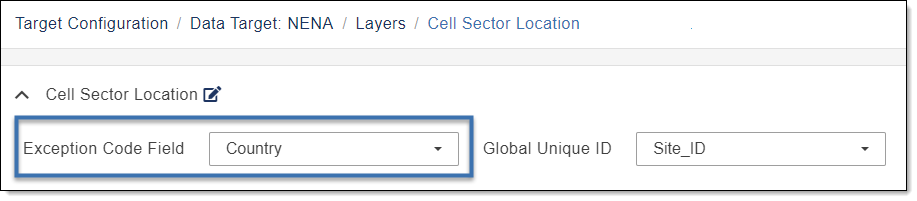
The following provides basic information for configuring an exception code. For additional instruction on locating and configuring the Exception Code Field, see Edit Exception Code Field.
-
Only one field may be used per layer at any given time.
-
There are no restrictions on the name of the exception code field so long as it meets GDH’s basic requirements.
Additionally, the user may choose to opt out of using exception codes by selecting the option None in the Exception Code Field drop-down shown above. If None is selected, then it does not matter if a user has field mapped an exception code field in their source data. Exception codes for that layer will not work.
gcexception and gc_exception fields. By default, when a new layer is added to a Data Target Configuration, the Exception Code Field drop-down automatically selects the field “gcexception” or “gc_exception,” if either exist, regardless of case sensitivity. If both exist, “gcexception” is selected. The administrative user can choose to turn off exception code usage for that layer by updating the Exception Code Field drop-down to None. See Edit Exception Code Field.
Important: Administrator be aware that if the Exception Code Field drop-down reads None, or contains a field which does not contain the user’s exception codes, GIS Data Hub will not apply exception codes on that layer.
Once exception codes have been activated for that layer in the data target, all exception codes field mapped to the Exception Code Field designated in the Data Target Configuration will be read by GIS Data Hub, and all valid exception codes within that field will be applied during that job run.
Important: Administrator be aware that the source data’s exception code field MUST be field mapped for any exception codes to work, even if exception codes are activated on that layer within the Data Target Configuration page. If the exception code field in the user’s source data is NOT properly field mapped, exception codes will not work for that agency. Additionally, only direct field mapping may be used when field mapping. Conditional, Spatial Lookup, and Tabular Lookup options for exception codes are not permitted and will not function. This means that an agency can only utilize exception codes if their layers directly contain an exception code field.
Exception Code Formatting
Valid exception codes utilize a 3-digit or 3-letter code within a field in your layer. These codes are pre-designated by GeoComm, Inc., and the current list can be found in the List of Exception Codes. See List of Exception Codes.
To apply an exception code to a feature, simply enter the value of the exception code in that feature’s exception code field. If multiple exception codes are required within one feature, they are to be separated by commas. Spaces between exception codes may be used, so long as the 3-digit code or letter is intact. Additionally, exception code fields may contain blank or null values.
Note: Invalid exception codes will be ignored.
The following provides examples of correct and incorrect exception code formatting.
| Will Work | Will Not Work | Notes |
|---|---|---|
| 999 | A single 3-digit exception code is correctly used. | |
| 999, ABC , 200 | A combination of 3-digit and 3-letter codes are used. Commas are correctly used to separate the multiple exception codes. Any spacing inconsistencies are ignored. | |
| 999,ABC, 123 | A combination of 3-digit and 3-letter codes are used. Commas are correctly used to separate multiple exception codes. Any spacing inconsistencies are ignored. | |
| 91999 | 91999 will not work as the exception code has more than 3-digits. | |
| 9#3 | 9#3 will not work as the exception code includes a special character and therefore the combination of digits is invalid. |
When an exception code field is configured in the Data Target Configuration page, the Exception Code Formatting QC check is automatically turned on for that layer. As a result, the user receives warning level fallouts for any features that contain invalid formatting in their exception code field.
Administrative Recommendations
Exception code is wanted. When exception code usage is wanted, it is recommended that the administrator visually confirm the exception code field is correctly configured in both the Data Target Configuration page and the Layer and Field Mapping page.
Exception code is not wanted. If exception codes are not wanted at the primary account level, then the recommendation is that they be turned off in the Data Target Configuration page by using the None option.
Additionally, exception codes can be turned on in the data target, but not utilized by an agency. To do this, ensure that the exception code field in the Layer and Field Mapping page is not mapped for all layers in the specific agency that wishes to opt out of exception codes.
Exception Codes and Critical QC Checks
QC checks set to a Critical severity level will NOT honor exception codes. If a QC check is critical, a fallout will be created. A QC check deemed critical means the data must be remediated until the fallout no longer exists. The only way to prevent a fallout for a critical QC check is to use the Global Exclusion (999) code (see 999 Exception Code) to remove that feature from the source data upon ingest. Otherwise, exception codes tied to specific QC checks will not work if the QC check is set to Critical.
Important: If the user does not want to use the Global Exclusion (999) code to prevent a Critical level fallout, the user must ensure the data satisfies the quality and accuracy level that particular QC check requires to prevent a fallout.
Subchecks and Exception Codes
Individual QC checks may be made of multiple smaller checks that are completed and require an exception code to create a fallout for specific information—we refer to these checks as subchecks. When an exception code is used for a subcheck, the feature it is used on is excluded from creating a fallout for that specific subcheck.
In order for exception codes on subchecks to work, the same prerequisites as exception codes for regular QC checks must be met and are detailed below. See List of Exception Codes, for specific subcheck QC check information.
-
The data target exception code field is populated by the administrator.
-
The layer and field that contains the exception codes in your source data has been properly mapped.
-
The correct exception code is applied within the source feature's exception code field.
If multiple exception codes are used, whether subcheck related or not, separate these codes within the exception code field with a comma.
-
As with regular exception codes, only Warning level QC checks are compatible with subcheck exception codes. QC checks classified as Critical severity are not honored with subcheck exception codes.