Features Outside of Polygon
The Features Outside of Polygon quality control (QC Quality Control) check identifies where points (e.g. site/structure address points) and/or lines (e.g., road centerlines) are located outside of a designated polygon layer such as a provisioning boundary. The feature is not covered by the polygon layer.
Note: By default, this QC check accounts for snapping tolerance. Individual polygon features with over 1 million vertices are simplified to ensure performance. Projection-Based Unit is used in this check. Projection-Based Unit indicates the unit of measurement is pulled from the Spatial QC Projection this data target uses. If no Spatial QC Projection is used in this data target, the unit is pulled from the Data Target's projection.
Note: By default, Features Outside of Polygon accounts for snapping tolerance within GIS Geographic Information System. A computer application that involves storing and manipulating electronic maps and related data. Also, mapping software combining spatial information about where places and events are located with data attributes describing those places and events. editing applications. The following are applied automatically when the Tolerance parameter is configured.
- Feet: When configured to 0, the check runs with built-in tolerance of 0.0087 feet for all spatial reference systems measured in feet like most state plane projections.
- Meters: When configured to 0, the check runs with built-in tolerance of 0.0027 meters for all spatial reference systems measured in meters.
 Required QC Prerequisites
To run this check, the following feature classes are required.
- Point or line feature class
- Polygon feature class
Configure QC Parameters
Configurations for QC check parameters contain filters to prevent selecting incompatible field types.
The following parameters can be specifically configured for the Features Outside of Polygon QC check.
- Run On: Non-configurable. This QC check inspects the target dataset.
-
Severity: Sets the importance level of this QC check’s fallouts. Critical fallouts prevent export package outputs but will still provide fallouts.
-
Point or Line Layer Name: The name of the point or line layer this QC check should inspect.
-
Reporting Unique ID: A unique identifier in the layer that can be used to uniquely identify a singular feature. If not configured, the source object ID is used instead.
-
Polygon Layer Name: The name of the polygon layer this QC check should inspect. For example: County_Boundary or PSAP Public Safety Answering Point. A set of call takers authorized by a governing body and operating under common management which receives 9-1-1 calls and asynchronous event notifications for a defined geographic area and processes those calls and events according to a specified operational policy._Boundary.
-
Tolerance (Projection-Based Unit): Choose how far a feature can extend beyond a polygon before it is flagged. Distance is projection based. 0 requires the feature to be entirely inside the polygon. 5 would allow the feature to be up to 5 meters outside the polygon without creating a fallout, assuming your projection is in meters.
What Does the Features Outside of Polygon QC Check Output Include?
The following information is included for this QC check's fallout output.
- QC check name
- Description of the QC check
- Feature class where the fallout appears
- Unique ID of the fallout record
- Extended information providing more details about the fallout
- Latitude and Longitude of the fallout's location
Examples - Issues Reported
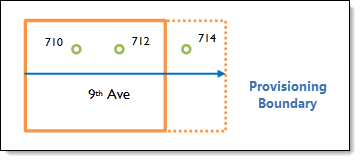
One example is when the provisioning boundary is the GIS polygon layer showing the 9-1-1 program boundaries. It is important to verify that all road centerlines and site/structure address points are within the provisioning boundary to ensure all addresses in the 9-1-1 program area are covered. In addition, this helps ensure there will be no duplication of data that a neighboring 9-1-1 program is responsible for.
In this example, the road centerline and site/structure address points are not completely within the provisioning boundary (solid orange line).