Polygon - Multi-Layer Overhang
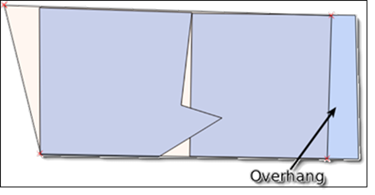
The Polygon - Multi-Layer Overhang quality control (QC Quality Control) check identifies where one polygon layer extends beyond the outer limits of another polygon layer to ensure that no overhangs exist. For example, configuring this QC check on your Law Boundary and comparing it against your County Boundary would flag any overhangs where the Law boundary extends past the County Boundary.
Note: By default, this QC check accounts for snapping tolerance. Polygon features with over 1 million vertices will be simplified to ensure performance. Projection-Based Unit is used in this check. Projection-Based Unit indicates the unit of measurement is pulled from the Spatial QC Projection this data target uses. If no Spatial QC Projection is used in this data target, the unit is pulled from the Data Target's projection.
Note: By default, Polygon - Multi-Layer Overhang accounts for snapping tolerance within GIS Geographic Information System. A computer application that involves storing and manipulating electronic maps and related data. Also, mapping software combining spatial information about where places and events are located with data attributes describing those places and events. editing applications. The following are applied automatically when the Sliver Filter parameter is configured.
- Feet: When configured to 0, the check runs with built-in tolerance of 0.0087 feet for all spatial reference systems measured in feet like most state plane projections.
- Meters: When configured to 0, the check runs with built-in tolerance of 0.0027 meters for all spatial reference systems measured in meters.
 Required QC Prerequisites
To run this check, multiple polygon feature classes are required.
Configure QC Parameters
Configurations for QC check parameters contain filters to prevent selecting incompatible field types.
The following parameters can be specifically configured for the Polygon - Multi-Layer Overhang QC check.
- Run On: Non-configurable. This QC check inspects the target dataset.
-
Severity: Sets the importance level of this QC check’s fallouts. Critical fallouts prevent export package outputs but will still provide fallouts.
-
Polygon Layer to Validate: The polygon layer that will be analyzed for overhangs compared to the baseline layer. For example: Law_Boundary or EMS Emergency Medical Service. Response centers for services such as ambulance, fire department, hospital, and poisen control center._Boundary.
-
Reporting Unique ID: A unique identifier in the validation polygon that can be used to uniquely identify a singular feature.
-
Baseline Polygon Layer Name: The authoritative polygon layer used as the standard for comparison. Serves as the control layer against which overhangs are detected. For example: Provisioning_Boundary or PSAP Public Safety Answering Point. A set of call takers authorized by a governing body and operating under common management which receives 9-1-1 calls and asynchronous event notifications for a defined geographic area and processes those calls and events according to a specified operational policy._Boundary.
-
Smallest Overhang to Report (Projection-Based Unit): Use to ignore overhangs smaller than a specified square area. 0 enforces the highest level of accuracy.
-
Sliver Filter (Projection-Based Unit): Shrinks overhang dimensions from all sides by this set distance to remove slivers from the results. 0 is strongly recommended and enforces the highest level of accuracy. For example, a 0.5 ft filter would shrink a 50 ft × 1 ft overhang to 49 ft × 0 ft, excluding it from the fallouts.
What Does the Polygon - Multi-Layer Overhang QC Check Output Include?
The following information is included for this QC check's fallout output.
- QC check name
- Description of the QC check
- Feature class where the fallout appears
- Extended information providing more details about the fallout
- Latitude and longitude of the fallout's location
Examples - Fallout Report Records
The example below shows a possible error message you may receive when a record fails the Polygon - Multi-Layer Overhang QC check. The extended information provides the layers where one feature class extends past a polygon from another layer in either square meters or feet. The unique feature ID displays the ID’s of polygons surrounding the overhang, helping pinpoint the issue referenced by the fallout.

Examples - Issues Reported
In this example, the section marked as Overhang is an overhang because the area of the polygon layer extends beyond the reference polygon layer.