Roads Need Zero Ranges
The Roads Need Zero Ranges quality control (QC Quality Control) check identifies and removes address range values from roads and replaces those values with 0. The user must flag the segment to be updated with a 701 or 702 exception code in their exception code field.
The 701 and 702 exception codes work as follows.
-
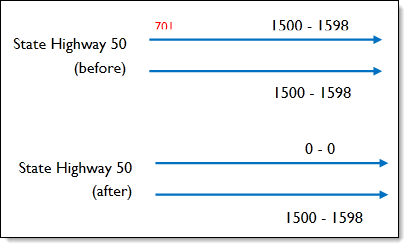
The 701 exception code replaces the road’s left side ranges with 0.
-
The 702 exception code replaces the road’s right side ranges with 0.
-
When both the 701 and 702 exception codes are used, the road's left and right sides are both replaced with 0.
Note that the records are zeroed out before any data validation QC checks run.
This QC check may be required when your data contains placeholder range values due to the needs of other consuming applications such as CAD Computer-aided Dispatch. A computer-based system that aids Public Safety Answering Point (PSAP) staff by automating selected dispatch and record keeping activities. systems, but in reality the road range itself should be represented by a zero address range for Next Generation 9-1-1 purposes.
 Required QC Prerequisites
To run this check, the following prerequisites must be met.
-
The data target exception code field is populated by the administrator. See Turning On Exception Codes.
-
The source's exception code field is field mapped. See Turning On Exception Codes.
-
The Roads Need Zero Ranges QC check is properly configured. See Configure Data Target QC Checks.
-
701 and/or 702 values are added to your records that need to be updated by GIS Geographic Information System. A computer application that involves storing and manipulating electronic maps and related data. Also, mapping software combining spatial information about where places and events are located with data attributes describing those places and events. Data Hub.
Configure the QC Parameters
Note: Only road segments with a 701 or 702 exception code are modified when this check is configured. All other road segments will have their values modified.
Configurations for QC check parameters contain filters to prevent selecting incompatible field types.
The following parameters can be specifically configured for the Roads Need Zero Ranges QC check.
-
Run On: Non-configurable. This QC check modifies the target dataset. Updates occur before data validation QC checks run.
-
Severity: Sets the importance level of this QC check’s fallouts. Critical fallouts prevent export package outputs but will still provide fallouts.
-
Layer Name: The name of the feature class this QC check should modify.
-
Left FROM Address: Represents the address number on the FROM node on the left side of the road segment.
-
Left TO Address: Represents the address number on the TO node on the left side of the road segment.
-
Right FROM Address: Represents the address number on the FROM node on the right side of the road segment.
-
Right TO Address: Represents the address number on the TO node on the right side of the road segment.
-
Parity Left: Indicates whether the left side of the road segment contains odd, even, both, or zero address range values. This value is updated to the user inputted Zero Parity Value when populated. This parameter is optional.
When either Parity parameter (left or right) is configured, both must be populated before the check can run.
-
Parity Right: Indicates whether the right side of the road segment contains odd, even, both, or zero address range values. This value is updated to the user inputted Zero Parity Value when populated.
When either Parity parameter (left or right) is configured, both must be populated before the check can run.
-
Zero Parity Value: The parity value in your data target schema that represents a road segment with a 0-0 address range. For example: Z, Zero, 0.
-
Validation Left: Indicates whether the left side of the road segment should be used for civic location validation. This value is updated to N when populated. This parameter is optional.
-
Validation Right: Indicates whether the right side of the road segment should be used for civic location validation. This value is updated to N when populated. This parameter is optional.
What Does the Ingest Validation - Roads Need Zero Ranges Output Include
Ingest validation QC checks do not produce a fallout as a standard practice. A fallout is produced only when the QC check is misconfigured. If this happens, update the configuration settings and try again.
Note: Ingest validation fallouts are included in the Fallout Report but are not included in the Summary Report.
Example
In this example, one segment of State Highway 50 is flagged with a 701 code, meaning the range on the left side of the highway is zeroed out before running QC checks.