SSAP to MSAG Synchronization
The SSAP Site Structure Address Point to MSAG Synchronization quality control (QC Quality Control) check compares address points to the Master Street Address Guide (MSAG) to see if any addresses in the Site/Structure Address Points (SSAP) data are not present in the MSAG.
Note: Synchronization QC checks can have leading zeros in the Emergency Service Number (ESN Emergency Service Number. A three to five digit number representing a unique combination of emergency service agencies (law enforcement, fire and emergency medical service) designated to serve a specific range of addresses within a particular geographical area, or Emergency Service Zone (ESZ). The ESN facilitates selective routing and selective transfer, if required, to the appropriate PSAP and dispatching of the proper service agency(ies).) fields for any of the layers or tables used in the QC check. The leading zeros will not negatively affect the comparison and an accurate fallout for the synchronization check is created, including accurately displaying your data with any leading zeros.
Note: For all field comparisons, null and empty/blank values are considered equal values. This includes ESN, Community, and street name field comparisons. For example, in SSAP to MSAG Synchronization, if an address point and its associated MSAG have an ESN of null and blank respectively, this will not cause a fallout as neither record contains an ESN. To create a fallout for a required field when it does not contain a value, utilize the Null Value in Field check.
Note: Leading or trailing spaces will not be trimmed in any fields used for comparison. To fix issues caused by such spaces, remove the extra space in your source data.
 Required QC Prerequisites
To run this check, a MSAG and SSAP feature class are required.
Configure QC Parameters
Configurations for QC check parameters contain filters to prevent selecting incompatible field types.
The following parameters can be specifically configured for the SSAP to MSAG Synchronization QC check.
- Run On: Non-configurable. This QC check inspects the target dataset.
- Severity: Sets the importance level of this QC check’s fallouts. Critical fallouts prevent export package outputs but will still provide fallouts.
- SSAP Layer Name: The name of the SSAP layer.
- SSAP - Reporting Unique ID: A unique identifier in the SSAP layer that can be used to uniquely identify a singular feature.
-
SSAP - Address Number Prefix: Represents the SSAP's address number prefix. Populate this parameter to have address prefix information included in the extended information field of the fallout report if one exists.
For example, if the Address Number Prefix is configured and the record includes a prefix value of 3W2N, the report will show 3W2N-1600 Venice Blvd in the extended information field, not 1600 Venice Blvd.
- SSAP - Address Number: Represents the SSAP's address number.
-
SSAP - Address Number Suffix: Represents the SSAP's address number suffix. Populate this parameter to have address suffix information included in the extended information field of the fallout report if one exists.
For example, when Address Number Suffix is configured and the record includes a suffix value of B, the report shows 1600 B Venice Blvd in the extended information field, not 1600 Venice Blvd. Note that null, empty strings, or whitespace do not count as a value.
- SSAP - Street Full Name: A list of street name fields that form the entire street name. For example: LSt_PreDir, LSt_Name, LSt_Typ, LSt_PosDir.
-
SSAP - Sub-addressing: Represents sub-addressing fields such as structure/building, wing, or unit to better distinguish the specific address point in question. Order listed here will reflect in the fallout messaging. Populate this parameter to have sub-addressing included in the extended information field of the fallout report if one exists.
For example, if the Sub-addressing parameter is configured, and the record includes a sub-addressing value of Room 305, the report will show 1600 Venice Blvd, Room 305 in the extended information field, not 1600 Venice Blvd.
- SSAP - Emergency Service Number (ESN): Represents the SSAP's Emergency Service Number (ESN).
- SSAP - MSAG Community: Represents the SSAP's Master Street Address Guide (MSAG) Community.
- MSAG Table Name: The name of the MSAG table.
- MSAG - Reporting Unique ID: A unique identifier in the MSAG table that can be used to uniquely identify a singular feature.
- MSAG - Address Number Prefix: Represents the address number prefix on the MSAG record.
- MSAG - Low Range: Represents the MSAG record's low range.
- MSAG - High Range: Represents the MSAG record's high range.
- MSAG - Street Full Name: A list of street name fields that form the entire street name. For example: LSt_PreDir, LSt_Name, LSt_Typ, LSt_PosDir.
- MSAG - Odd/Even/Both (OEB): Indicates whether the MSAG record contains odd, even, or both range values.
- MSAG - Emergency Service Number (ESN): Represents the MSAG record's Emergency Service Number (ESN).
- MSAG - MSAG Community: Represents the MSAG record's MSAG Community.
- Case Sensitivity: Select Match Case to enable and maintain the integrity of upper or lower case text in your data. See Case Sensitivity.
What Does the SSAP to MSAG Synchronization QC Check Output Include?
The following information is included for this QC check's fallout output.
- QC check name
- Description of the QC check
- Unique identifier of the SSAP record
-
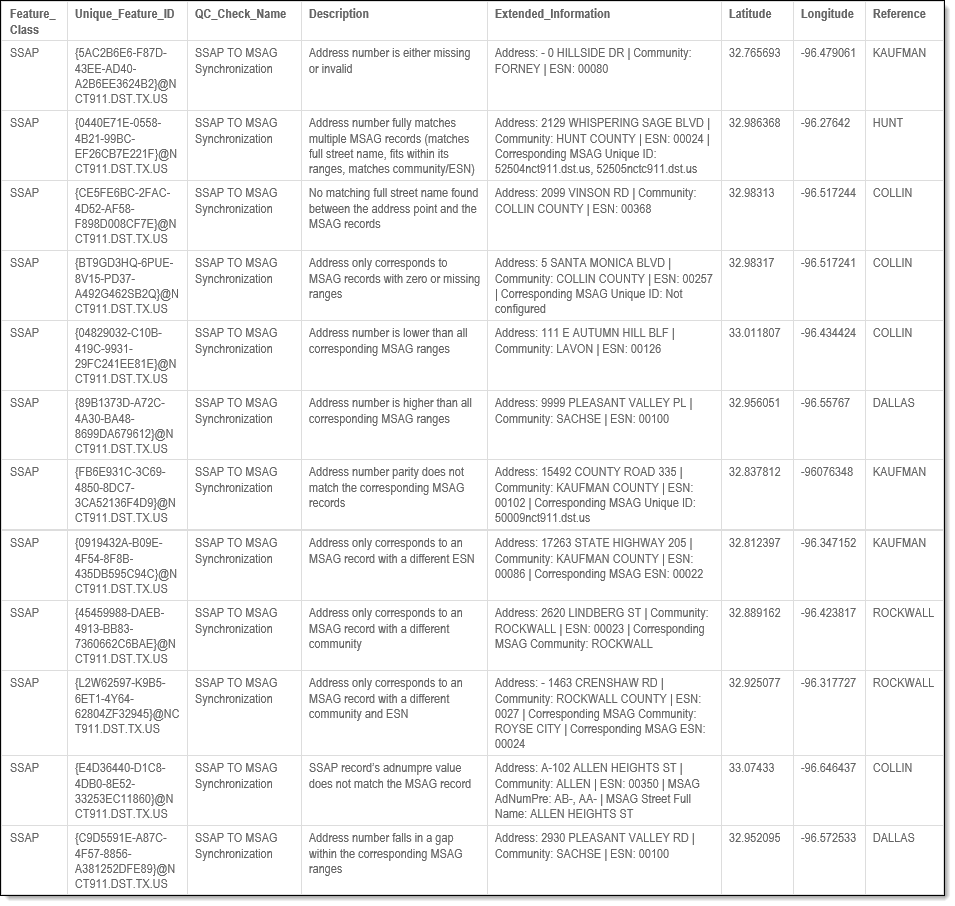
Specific failure information - criteria causing the SSAP to MSAG comparison record to fail. The fallout message values are added to the Extended Information description field in the fallout report. The message identifies specific fallout messaging values to assist in the identification of mismatching fields for the SSAP and MSAG records. The extended information in the fallout report provides up to the first 5 ID values listed in alphanumeric order, if applicable.
-
MSAG - Reporting Unique ID
-
MSAG - Emergency Service Number (ESN)
-
MSAG - Community
-
MSAG - Address Number Prefix
-
- Latitude and Longitude coordinates
Examples - Fallout Report Records
The examples below shows possible error messages you may receive when a record fails the SSAP to MSAG Synchronization QC check. The extended information provides the detected and expected results when verifying that addresses in the SSAP contain a corresponding record in the MSAG.
Examples - Issues Reported
In these examples, multiple scenarios are shown defining when a record fails or passes the SSAP to MSAG Synchronization QC check.
-
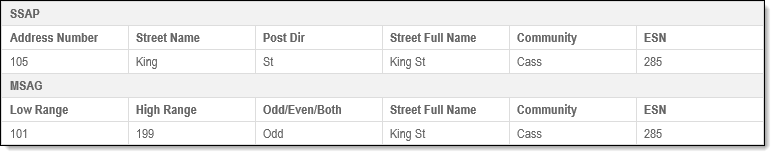
Pass: This is an example of a good match that passes the QC check.
-
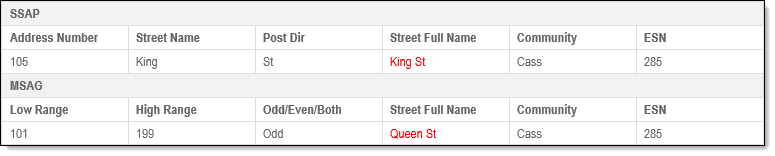
Fail: This example shows when the QC check fails due to the Street Full Name field being mismatched. There is no MSAG with a matching street name.
-
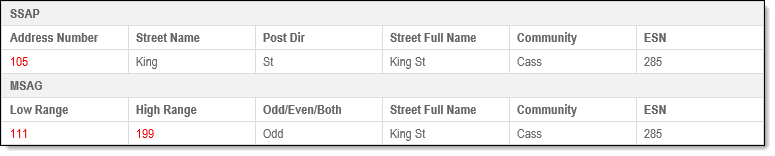
Fail: This example shows when the QC check fails due to the Address Number being below the matching MSAG's range.
-
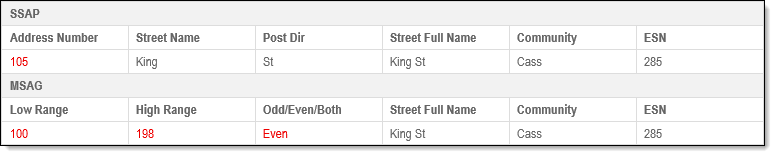
Fail: This example shows when the QC check fails due to the Address Number being out of parity with the MSAG range.
-
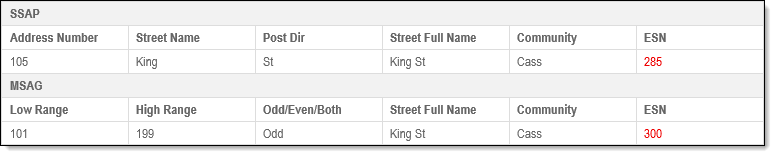
Fail: This example shows when the QC check fails because the ESN field is mismatched.
-
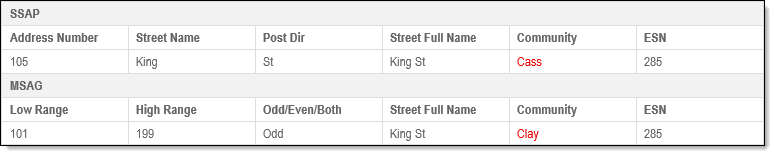
Fail: This example shows when the QC check fails because the Community field is mismatched
For information on using exception codes see Exception Code Basics or to view a list of subchecks completed when running the SSAP to MSAG Synchronization QC check and any exception codes for each subcheck, see SSAP to MSAG Synchronization Subchecks.