Download Source Data Files
There may be times when submitted source data needs to be reviewed to troubleshoot unexpected results. From the Submit New Data page, authorized users have the ability to download source data for these reviews.
Uploaded data is added to the access recent uploads list—the list includes your most recent four uploads, partial  or complete
  . Your files will be available regardless if your upload processed successfully or failed to better assist in troubleshooting.
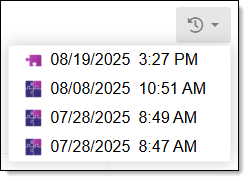
As additional uploads are submitted, the oldest files are automatically deleted from the list. If no data files are available to download, the button is gray (inactive) and a message alerting you that recent uploads are not available is shown if selected.
Complete the following to download previously submitted source data files.
-
From the Side Panel, select Submit New Data.
-
In the upper right corner, click the Access recent uploads
 button.
A list of available uploads are shown.
-
In the Access recent uploads drop-down, select the date of the source data files you want to download.
The Access recent uploads button shows a progress indicator while the data is downloading. When the download is complete, or if it fails, a confirmation message is shown in the upper right corner and the file is added to your downloads folder.
The name of the zip file created is: GDH_Source_Upload_YYMMDD_HHMM (user's local time).
Note: If the system's gdh_complete_dataset is missing, this implies a processing error occurred with your data upload. Reach out to your GeoComm team for assistance with failed uploads, see Contact Us.
 What's Included in the GDH Source Upload Zip File?
The following provides some additional details for what is included in the zip file.
-
The zip file includes your source data as you uploaded it.
-
GIS Geographic Information System. A computer application that involves storing and manipulating electronic maps and related data. Also, mapping software combining spatial information about where places and events are located with data attributes describing those places and events. Data Hub's standardized version of your data, where all feature classes, Shapefiles, CSV's, excel documents, and tables are combined into one geodatabase (GDB).
-
A standardized GDB is included as a zip file called "gdh_complete_dataset".
-
Your zipped source data is provided exactly as it was uploaded other than the zip file name being updated to lowercase.
-
Important: GIS Data Hub uses updated technology that may be incompatible with older versions of ArcGIS Pro or ArcMap. Therefore, viewing GIS Data Hub's normalized dataset with all your data may require a newer version of ArcGIS Pro to view.